
If you’re like most GTA fans, you’re probably itching to dive into the vibrant world of roleplay servers, custom mods, and endless multiplayer fun beyond Rockstar’s official servers. In this guide, I’ll walk you through everything you need for a smooth Fivem download and install Fivem on your PC in 2026.
We’ll cover what FiveM actually is, the easiest and safest way to get it set up, and detailed steps that even beginners can follow without frustration. Whether you’re new to mods or just updating your setup, I’ve got you covered with clear, straightforward instructions.
What is FiveM and GTA V Multiplayer Modification?
FiveM is a popular GTA V multiplayer modification developed by the Cfx.re team. It lets you play on customized dedicated servers instead of Rockstar’s official GTA Online. Think of it as unlocking a whole new dimension of GTA V — with player-run roleplay communities (like police, EMS, mechanics, gangs), custom cars, maps, weapons, clothing, and unique game modes that aren’t possible in vanilla GTA Online.
It’s completely separate from Rockstar’s servers, so you won’t risk your main GTA Online account. FiveM focuses on immersive experiences, and it’s one of the biggest reasons why GTA V is still thriving years after launch. Millions of players use it daily for everything from serious roleplay to fun casual servers.
Note: You need a legitimate copy of GTA V (Steam, Epic Games, or Rockstar Launcher) installed and updated first. FiveM works best with the Legacy version in many cases, but it auto-detects your installation in most setups.
How to Download and Install FiveM in 2026
The process is simpler than ever in 2026. The easiest and safest way is to download directly from the official site. Avoid random third-party sites to prevent malware or outdated files.
Download it from Official FiveM Website
To download it head straight to the official FiveM website here: https://fivem.net/ and click the prominent “Download Client” button (FiveM.exe).
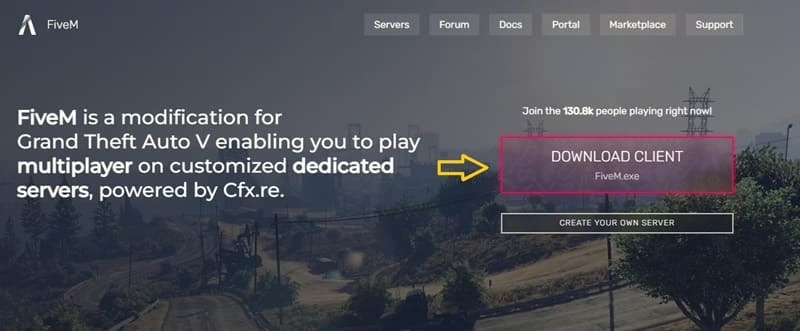
This is the most reliable method the file is small, and the installer handles most of the heavy lifting.
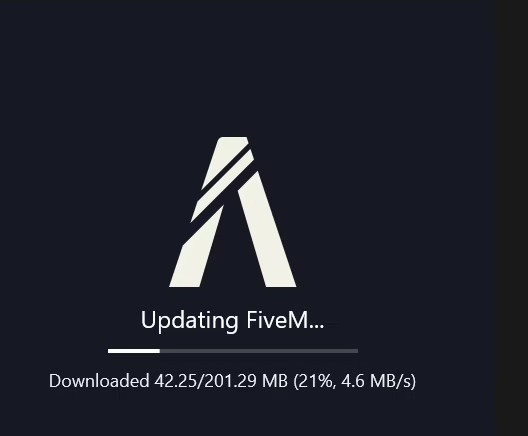
How to Install Fivem on PC
After downloading here are detailed step by step instruction for installing fivem on pc.
1. Prepare Your PC:
- Make sure you have GTA V fully installed and updated. Launch it once via your launcher (Steam/Epic/Rockstar) to ensure everything is working.
- Close GTA V completely before proceeding.
- Also, ensure your Windows is updated (Windows 10 or 11 recommended).
2. Run the Installer:
- Locate FiveM.exe and double-click it.
- If Windows shows a security warning, click “Run anyway” (it’s safe from the official site).
- Right-click and “Run as Administrator” if you face any issues.
3. Accept Terms and Install:
- Review the license agreement and click “Sure, I agree!” The installer will set up FiveM in its own folder (often in your user directory or the one you chose).
- This process takes just a minute or two.
4. Let FiveM Detect GTA V:
- When prompted, FiveM will automatically search for your GTA5.exe file.
- If it doesn’t find it, you can manually browse to your GTA V installation folder:
Steam: Usually C:\Program Files (x86)\Steam\steamapps\common\Grand Theft Auto V
Epic Games: C:\Program Files\Epic Games\GrandTheftAutoV Select GTA5.exe and confirm.
5. Update and Launch:
- FiveM may download additional components or updates on first run.
- This is normal let it complete. Once done, you’ll see the FiveM client interface with a list of servers.
6. Join a Server:
- Browse servers, pick one (many have 100+ players), and connect.
- It will automatically download any required resources for that server.
- First-time connections can take a few minutes, but subsequent ones are fast.
Also know: Ryujinx Download in 2026: Get the Nintendo Switch Emulator
Pro Tips for Smooth Installation:
- Disable your antivirus temporarily during install if it flags the file (common false positive).
- Have at least 8GB RAM (16GB recommended) and enough storage — GTA V + FiveM can take over 100GB combined.
- Run everything as Administrator if you encounter connection or permission errors.
- For best performance, close background apps and ensure your graphics drivers are updated.
If you run into issues like “GTA V not found” or connection problems, the official docs at docs.fivem.net have excellent troubleshooting.
Conclusion
Setting up FiveM opens up an incredibly fun and social side of GTA V that keeps the game fresh even in 2026. As Amanda, my top recommendation is always to go with the official Fivem download straight from fivem.net. It’s the fastest, safest, and most up-to-date method — no fuss with shady mirrors or outdated files. Just follow the steps above, and you’ll be roleplaying in no time.
Stay safe, join welcoming servers, and most importantly have fun creating your stories in Los Santos! If you hit any snags, drop a comment below and I’ll help where I can.

Amanda Starc
Amanda is a dedicated technical web content writer with a passion for transforming complex ideas into compelling and accessible online narratives. With a background in web development, and digital Marketing I bring a unique blend of technical expertise and creative storytelling to the digital domain.
