
Hey everyone, welcome back! If you’re searching for Ryujinx download or how to download Ryujinx in 2026, you’re not alone. Many Switch fans still want to enjoy their favorite games on PC through this powerful emulator.
In this helpful guide, I’ll explain what happened to the original project, where to find active forks today, and the easiest, safest ways to download and set it up. We’ll go step-by-step so even beginners can follow along without confusion. My goal is to make the process clear while stressing safety and legality.
Let’s get you up and running smoothly!
What is Ryujinx?
Ryujinx is a popular open-source Nintendo Switch emulator originally developed by gdkchan. Written in C#, it became well-known for its excellent accuracy, great performance, and user-friendly interface compared to other emulators.
Key highlights of Ryujinx include:
- Strong compatibility with a wide library of Switch games
- Support for both Windows, Linux, and macOS
- Features like handheld mode, docked mode, multiplayer (via LDN), mod support, and shader caching
- Regular updates during its active years (before 2024)
Unfortunately, in October 2024, the original Ryujinx project was discontinued after the lead developer was contacted by Nintendo. The main GitHub organization and downloads were removed. However, the open-source nature of the project means community forks continue to keep the emulator alive in 2026.
The most active and widely recommended fork right now is Ryubing (a continuation of Ryujinx with quality-of-life improvements).
How to Download Ryujinx in 2026
Because the original project is no longer active, you’ll be downloading a maintained fork. The situation can change quickly in the emulation scene, so always verify you’re on a trusted source.
Important Note from me: Emulation itself is legal, but downloading copyrighted game files (ROMs/NSP/XCI) that you do not personally own is illegal. I strongly recommend only using game dumps from consoles you personally own. Stay safe and respect copyright laws.
The Easiest and Safest Way to Download Ryujinx in 2026
The best place in 2026 is the active fork maintained by the Ryubing team.
1. Official Ryubing GitHub:
Here are detailed, beginner-friendly steps:
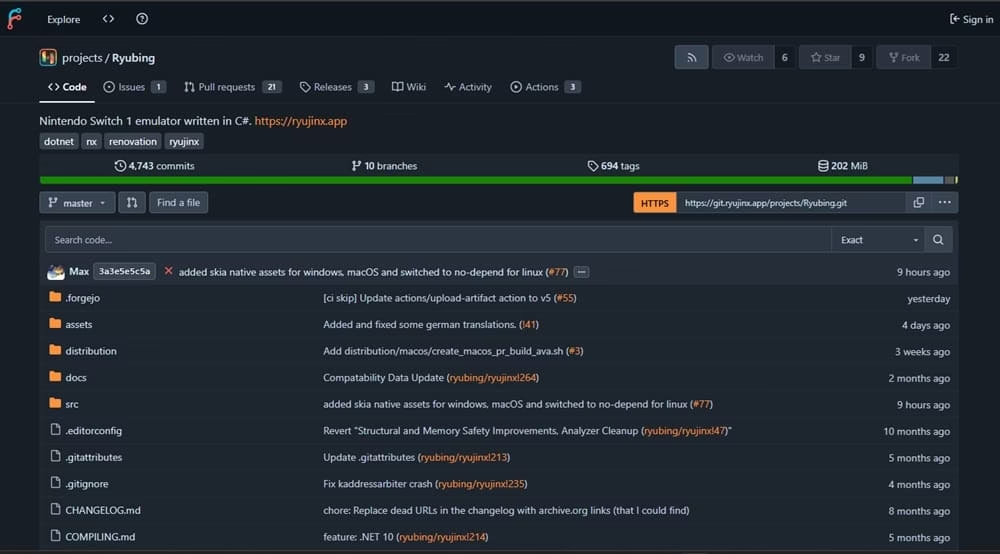
- Step 1: Visit the official source Go to the Ryubing GitHub repository (Always double-check the URL to avoid fake sites.)
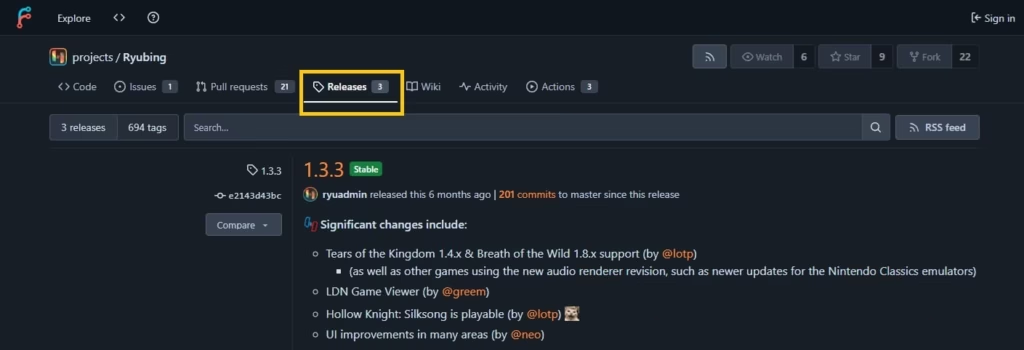
- Step 2: Find the latest releases Scroll down to the Releases section or look for the “Latest” release at the top.
- Step 3: Choose the right build for your system Download the appropriate file for your operating system:
- Windows: Look for Ryujinx-Win64-*.zip or the Canary version if you want cutting-edge updates.
- Linux: Choose the .AppImage or Linux-specific build.
- macOS: Select the macOS version if available.
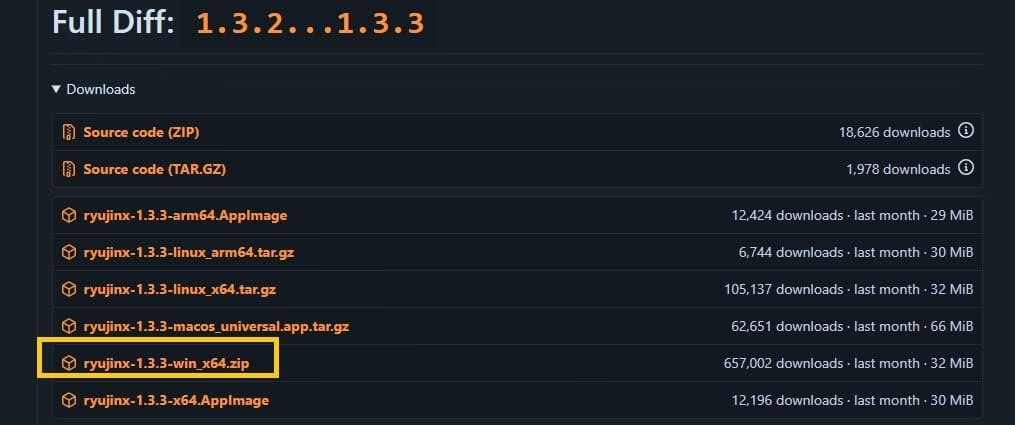
- Step 4: Download and verify Click the download link for the latest stable or Canary build. Some users prefer Canary builds for better game compatibility in 2026.
- Step 5: Extract the files Unzip the downloaded file using 7-Zip, WinRAR, or the built-in extractor. Extract everything into a new folder (e.g., C:\Emulators\Ryubing).
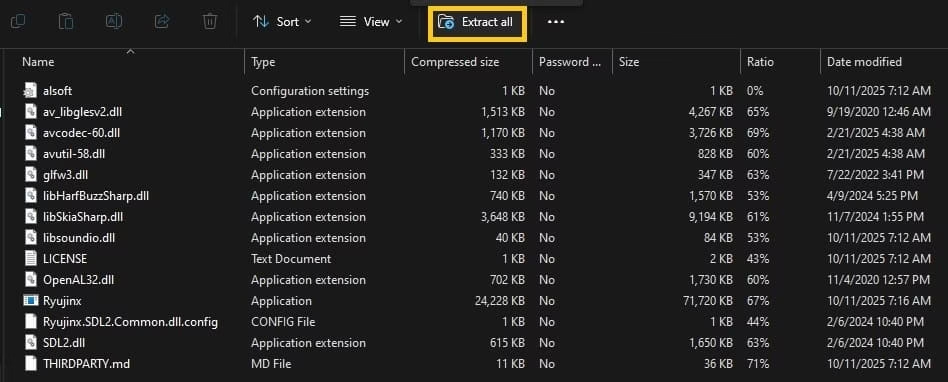
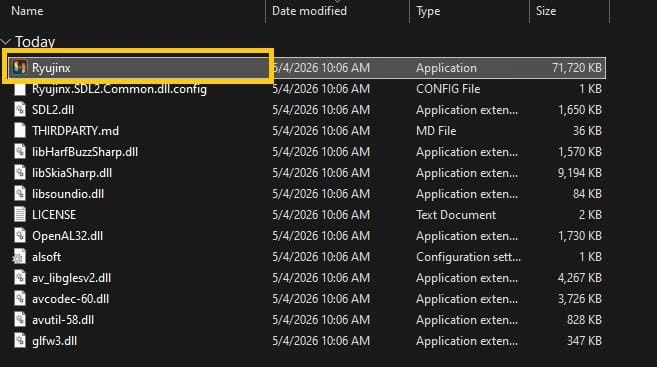
- Step 6: Launch the emulator Open the folder and run Ryujinx.exe (on Windows). The first launch may take a moment as it sets up necessary folders.
Step 7: Add firmware and prod.keys (Essential!)
Step 8: Lastly Add your games Go to File > Open Ryujinx Folder to locate the games directory. Add your legally dumped game files (NSP, XCI, or extracted folders).
Ryujinx will automatically detect the games once they are placed here.
Also know: Metro Games in Order of Release in 2026
How to Add Firmware and Prod.Keys in Ryujinx
Adding firmware and prod.keys to Ryujinx is super simple and only takes a few minutes. These two things are essential so your Switch games can run properly on the emulator.
What You Need First:
- Latest version of Ryujinx installed and opened.
- prod.keys file (latest version).
- Firmware file (usually in .zip or .xci format, matching your keys version).
Important: These files should be legally dumped from your own Nintendo Switch. Use them responsibly.
Step 1: Add Prod.Keys (Do This First)
- Open Ryujinx.
- At the top-left, click File → Open Ryujinx Folder.
- You will see a folder called system. Open it.
- Copy your prod.keys file and paste it inside the system folder (or simply drag and drop it).
- Close the folder.
That’s it! Your keys are now installed. Ryujinx can now decrypt game files properly.
Step 2: Install Firmware
- Go back to the main Ryujinx window.
- Click on Tools in the top menu.
- Select Install Firmware → Install a firmware from XCI or ZIP.
- Browse and select your firmware .zip file, then click Open.
- A popup will appear asking to confirm — click Yes.
- Wait for a few seconds while it installs (you’ll see a progress bar).
Once done, you can check the installed firmware version on the right side of the Ryujinx window.
Pro tips for a smooth experience:
- Start with the Stable build if you’re new. Switch to Canary only if a specific game needs newer fixes.
- Enable automatic updates if the fork supports it.
- Allocate enough RAM and use a decent GPU (NVIDIA or AMD with Vulkan support works best).
- Regularly check the project’s Discord or GitHub for community help.
Also know: Top 5 Adventure Indie Games to Try in 2026
Conclusion
Even though the original Ryujinx project was discontinued in 2024 due to legal pressure from Nintendo, active community forks like Ryubing keep the spirit of the emulator alive in 2026. The setup process is still quite straightforward if you follow trusted sources and take your time.
As Amanda, my personal recommendation is this: Always start at the Ryubing GitHub and download the latest stable or Canary build directly from the Releases page. Avoid random third-party sites, shady download links, or “free ROM” bundles — they often come with malware or outdated versions.
Take it slow, back up your files, and prioritize safety. Emulation can be a fantastic way to revisit your favorite Switch games on a powerful PC, but doing it responsibly is key.
If you run into any issues during setup or have questions about specific games, feel free to drop a comment below — I’m here to help!
Stay safe, have fun gaming, and happy emulating! 🎮

Amanda Starc
Amanda is a dedicated technical web content writer with a passion for transforming complex ideas into compelling and accessible online narratives. With a background in web development, and digital Marketing I bring a unique blend of technical expertise and creative storytelling to the digital domain.
