
Hey there! If you’re tired of juggling multiple streaming apps and watching your monthly bill creep higher, you’re not alone. With so many options out there, finding the best streaming platforms and bundles can feel overwhelming in 2026.
I’ve spent the last few months testing popular streaming bundles, comparing prices, content libraries, and real-world performance across different devices. In this guide, I’ll break down the top streaming platforms and bundles that actually deliver great value, along with how a VPN for streaming can enhance your viewing experience.
We’ll cover what each bundle offers, their unique features, current pricing, safety, compatible devices, and standout shows/movies. By the end, you’ll know exactly which combination fits your watching habits and budget — without wasting money on services you barely use.
What Are the Best Streaming Platforms and Bundles?
A streaming platform is simply an app or service that lets you watch movies, shows, or live sports over the internet, no cable box, no fixed schedule, just pick something and press play. Netflix, Disney+, Hulu, Max, Apple TV+, and Peacock all fall into this category, each with its own library, pricing, and standout originals.
A streaming bundle takes this a step further. It groups two or three of these platforms under one monthly price, and that price is almost always lower than paying for each app on its own. Instead of hopping between five different logins to catch everything you actually want to watch, a bundle puts most of it under one roof.
The smart bundles in 2026 aren’t random pairings. They work because the libraries complement each other instead of overlapping:
- Kid friendly shows sitting alongside big budget blockbusters
- Award winning dramas paired with lighter, mainstream comfort watches
- Live sports coverage
After digging through the pricing structures and content libraries this year, two combinations stand out as genuinely worth the money. The official Disney+, Hulu, and Max bundle remains the heavyweight option, while the Apple TV+ and Peacock pairing has quietly become one of the smarter picks for anyone who wants prestige originals without paying full price for a fourth or fifth subscription.
Best Streaming Platforms and Bundles in 2026
Here are the best Streaming platfroms and bundles that i found worthy to be subscribed in 2026. I have judged them on the basis of their library and what they can offer in the given price. So i don’t have to use multiple streaming platfroms and subscriptioins.
Let’s begin with Best Streaming Platforms in 2026
Before jumping into bundles, it helps to know the platforms themselves. Netflix, Disney+, Hulu, Max, Apple TV+, and Peacock each bring something different to the table, some lean heavy on originals, others carry live sports or next day network TV, and a few specialize in family content. Knowing what each one actually offers makes it easier to see why certain pairings work so well together.
Top 5 platforms ka quick comparison and details:
| Platform | Starting Price (with ads) | Best For | Standout Titles |
|---|---|---|---|
| Netflix | ~$8.99/month | Binge worthy originals and global hits | Stranger Things, Squid Game, The Crown |
| Disney+ | ~$9.99/month | Family content, Marvel, Star Wars | Andor, The Mandalorian, Pixar classics |
| Max | ~$9.99/month | Prestige dramas, HBO originals | The Last of Us, House of the Dragon, Succession |
| Apple TV+ | ~$9.99/month | Cinematic, ad-free originals | Severance, Ted Lasso, Silo |
| Peacock | ~$7.99/month | Live sports, NBC shows, comedies | The Office, WWE, Premier League |
Now we have a list of top 5 streaming platforms we can move on the next section that can save our hard earn money – The streaming Bundles.
Best Streaming Bundles in 2026
Now that you know what each platform brings to the table, here’s where things get interesting. Pairing the right two or three services together can cut your monthly bill significantly, sometimes by half, without losing access to the shows and movies you actually care about. Below are the combinations that consistently deliver the most value, based on pricing, content overlap, and what real households tend to watch.
1. Disney+, Hulu & Max Bundle (The Ultimate All-Rounder)
This is the heavyweight of the streaming world right now, three massive libraries folded into a single package. Marvel, prestige dramas, and next day network TV all sitting under one login, and the value only gets stronger the more mixed your household’s taste is.
Unique Features:
- One login for easy switching between apps (Hulu often acts as the central hub)
- Huge mix of family content, prestige TV, and blockbuster movies
- Ad-supported and ad-free tiers available
- Supports 4K streaming and Dolby Atmos on premium plans
- Frequent new releases from Disney, Marvel, Star Wars, Pixar, FX, and Warner Bros.
Price (as of April 2026):
- With ads: ~$19.99/month
- Ad-free (4K): ~$32.99–$33/month
Is it safe to use? Yes, completely safe. All services come from reputable companies (Disney and Warner Bros. Discovery) with strong privacy policies and secure payment systems.
Devices to use: Smart TVs (Samsung, LG, Sony, etc.), Roku, Fire TV, Apple TV, Android TV, iOS, Android phones/tablets, gaming consoles (PlayStation, Xbox), and web browsers.
Key Shows & Movies Available:
- Disney+: Andor, Daredevil: Born Again, The Mandalorian, all Marvel Cinematic Universe films, Pixar classics
- Hulu: The Bear, Only Murders in the Building, House of the Dragon (via Max integration), current-season network TV
- Max: The Last of Us, House of the Dragon, Succession, The White Lotus, Warner Bros. theatrical releases
This bundle is perfect if your household has mixed tastes — kids in one room, adults wanting serious dramas in another.
Also see: Best 123movies Alternatives to Use in 2026
2. Disney+ & Hulu Bundle (Best for Families & Everyday Viewing)
Skip Max’s heavier dramas and this lighter pairing still packs plenty of value. It’s built for households juggling kids’ shows in one room and current network TV in another, all without the extra cost of a third subscription.
Unique Features:
- Combines family magic with Hulu’s broad entertainment library
- Excellent for households with kids and adults
- Hulu’s next-day TV episodes + Disney’s timeless classics
- Easy profile switching and parental controls
Price:
- With ads: ~$12.99/month
- Ad-free: ~$19.99/month
Safe to use? Yes — official Disney bundle with top-tier security.
Devices: Same broad compatibility as above (almost every modern device).
Key Content:
- Disney+ classics and new Star Wars/Marvel releases
- Hulu originals like The Handmaid’s Tale, Shōgun, reality shows, and current TV
Great starter bundle for most families.
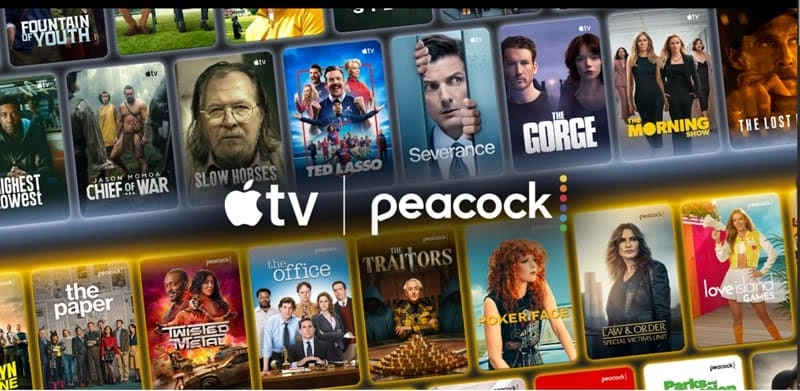
3. Apple TV+ & Peacock Bundle (Best Premium Value Pairing)
A smart, growing pairing that puts polished, award winning originals right next to NBCUniversal’s massive comedy and sports catalog. It’s quietly become one of the better deals for anyone who wants quality over sheer volume.
Unique Features:
- Apple’s cinematic, award-winning originals (often ad-free by default)
- Peacock brings live sports (including Premier League, Olympics), NBC shows, and comedies
- Clean, beautiful interface on Apple devices
- Very competitive pricing for the quality
Price:
- Around $14.99–$15/month for both (Peacock with ads)
- ~$20/month for ad-free Peacock version
Safe to use? Absolutely. Both Apple and NBCUniversal are trusted brands.
Devices to use: Best on Apple TV, iPhone, iPad, but also works great on Roku, Fire TV, Smart TVs, Android, and web.
Key Shows:
- Apple TV+: Severance, Ted Lasso, Silo, Slow Horses, Foundation
- Peacock: The Office, Parks and Recreation, Saturday Night Live, WWE, live sports, Poker Face
Ideal if you love prestige TV and occasional live sports or comfort rewatches.
Also see: Jesse Stone Movies in Order of Sequence
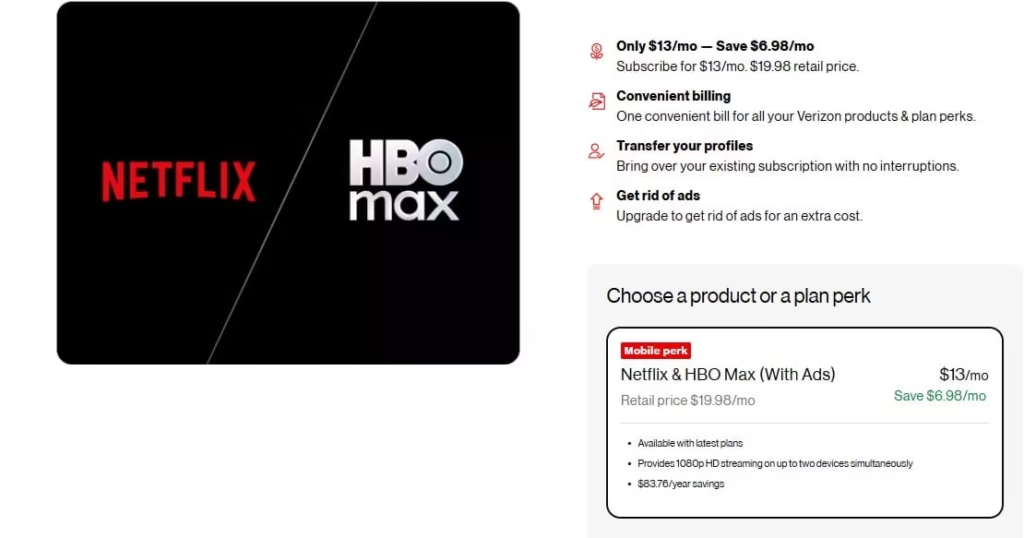
4. Verizon myPlan: Netflix & Max Bundle (Best Carrier Perk Deal)
If you’re already a Verizon customer, this one is worth checking, though it’s not quite the flat deal it used to be. It’s a carrier exclusive pairing that stacks Netflix and Max together as a myPlan perk.
Unique Features:
- Available only to Verizon myPlan customers as an add on perk
- Combines Netflix’s massive original catalog with Max’s prestige dramas
- Can be stacked alongside Verizon’s Disney Trio perk for even more coverage
- No separate signup hassle, everything gets added straight to your phone bill
Price:
- Originally launched at $10/month combined, but Netflix’s repeated price hikes through 2025 and into 2026 have pushed the effective rate closer to $13/month once promotional pricing ends
- Verizon absorbs part of the increase but passes along costs beyond the basic ad tier
Is it safe to use? Yes. Both platforms run through official Verizon and studio partnerships with standard account security.
Devices to use: Same wide device support as standalone Netflix and Max, smart TVs, streaming sticks, phones, tablets, and consoles.
Key Shows & Movies Available:
- Netflix: Stranger Things, Squid Game, The Crown
- Max: The Last of Us, House of the Dragon, Succession, The White Lotus
Worth grabbing if you’re already a Verizon myPlan customer, but don’t expect the price to stay locked forever. Netflix has raised rates twice in the last 14 months, and carrier perks tend to absorb those hikes eventually.
5. Prime Video Channels (Best for Mixing and Matching)
Instead of picking one fixed pairing, Prime Video lets you attach practically any premium channel you want directly to your existing Prime account. It’s less a single bundle and more a build your own setup, over a hundred services sit inside one app, one login, one bill.
Unique Features:
- Add channels like Max, Starz, Apple TV+, Paramount+, and dozens more without downloading separate apps
- Two service pairings such as Max and Starz, or STARZ and BritBox, often come pre-bundled at a discount
- Everything lives inside the Prime Video interface, so switching between shows on different services takes one tap
- Cancel or swap add-ons anytime, no long term lock in
Price:
- Requires an active Prime membership (~$14.99/month or $139/year)
- Individual add-ons typically run $5 to $21 depending on the channel, with paired bundles like Max and Starz priced around $20.99/month combined
Is it safe to use? Yes. Billing runs entirely through Amazon’s own payment system, so there’s no juggling separate cards or accounts across services.
Devices to use: Anywhere the Prime Video app runs, smart TVs, Fire TV, Roku, iOS, Android, gaming consoles, and web browsers.
Key Shows & Movies Available:
- Max add-on: The Last of Us, Succession, House of the Dragon
- Starz add-on: Outlander, Sweetpea, Power
- Apple TV+ add-on: Severance, Ted Lasso, Silo
This one’s ideal if your taste doesn’t fit neatly into a pre-packaged bundle. Pick exactly what you watch, skip what you don’t, and avoid paying for five apps when you really only use two.
Conclusion: My Top Recommendation as Amanda
After digging through pricing pages, testing interfaces, and comparing what each library actually offers in 2026, the Disney+, Hulu, and Max bundle still comes out on top. The ad-free version, sitting around $33 a month, isn’t cheap, but it covers an enormous range of ground. Marvel and Pixar for family nights, Hulu’s next day network shows and comedies, and Max’s prestige dramas like The Last of Us and House of the Dragon all living under one login. For most households, that single bundle quietly handles 80 to 90 percent of what people actually sit down to watch.
If the budget’s tighter or the household skews younger, the Disney+ and Hulu bundle is the smarter entry point. At roughly $13 to $20 a month, it strips away Max’s heavier dramas but keeps everything a family actually reaches for on a Tuesday night.
For anyone who wants more control over what they’re paying for, Prime Video Channels is worth a serious look too. Rather than committing to a fixed pairing, you attach only the channels you’ll actually use, Max, Starz, Apple TV+, whatever fits, and drop them the moment you’re done. It’s less flashy than a headline bundle, but it avoids paying for content that sits untouched.
One thing worth keeping in mind heading into the rest of 2026: prices aren’t static. Netflix has raised rates more than once in the past year, and that ripple has already reached carrier perks like Verizon’s Netflix and Max bundle. Whatever you pick, it’s worth checking the current price every few months rather than assuming it’ll stay put.
My honest advice stays the same as always. Don’t subscribe to everything at once. Pick one bundle, live with it for a month or two, and only add or swap once you actually know what you’re watching and what’s just sitting there unused. Most of these services let you cancel anytime, so there’s little reason to overcommit early.
What are you watching right now? Drop a comment, happy to help you figure out the right setup for your household.
Related:
Stream East Alternatives to Watch Free Sports
Best Streaming Sticks for TV in 2026
Best Soap2day Alternatives For Streaming Movies

Amanda Starc
Amanda is a dedicated technical web content writer with a passion for transforming complex ideas into compelling and accessible online narratives. With a background in web development, and digital Marketing I bring a unique blend of technical expertise and creative storytelling to the digital domain.
