You sit down with a spreadsheet or basic app, log your expenses for a week, and feel motivated. Then life hits unexpected freelance gig delay, a business supply cost spike, or that “quick” coffee run that turns into daily habit. By month-end, you’re confused, stressed, and no closer to your goals.
Manual tracking is exhausting and error-prone. Generic rules ignore your irregular income as a freelancer or variable costs as a small business. This is where AI tools for budgeting change everything. They analyze your real transactions, learn your patterns, predict cash flow, suggest smarter choices, and even roast your bad habits in a fun way.
These tools don’t just track they help you save money proactively with personalized insights, automation, and conversational guidance. Whether you’re a beginner building habits, a freelancer juggling irregular pay, or running a business, the right AI makes budgeting effortless and effective.
Top AI Tools for Budgeting in 2026
Here are standout options that go beyond basic tracking. I’ve focused on tools with strong AI capabilities, practical value, and real-user appeal for beginners, freelancers, and businesses.
1. Cleo
Cleo stands out as your sassy AI money coach that feels like texting a smart (and brutally honest) friend. It connects to your accounts and turns dry numbers into actionable, conversational advice.
Best For: Beginners and freelancers who hate traditional budgeting and want something engaging and motivational. Great for those with irregular income.
Pricing: Free basic plan available. Paid tiers: Plus (~$5.99/mo), Pro (~$8.99/mo with advanced AI), Builder (~$14.99/mo). Flexible and often has promotions.

Key Features:
- Chat with an AI that remembers your goals and gives personalized advice like “Can I afford this trip?”
- Smart spending analysis that calls out impulse buys with humor
- Automated savings that pulls small amounts you won’t miss
- Debt tracking, credit insights, and even cash advances in higher tiers
- Behavioral coaching that adapts to your patterns over time
Real Use Case: As a freelancer with lumpy income, I linked my accounts during a dry month. Cleo spotted my recurring takeout habit, suggested “Cleo Cover” alternatives, and quietly built a small buffer. It predicted my next invoice gap and adjusted my budget—helping me avoid overdraft without feeling deprived. The witty roasts made me actually check the app daily.
Also know: Most Reliable and Secure VPN for Mac and Windows (Free & Paid)
2. Copilot Money
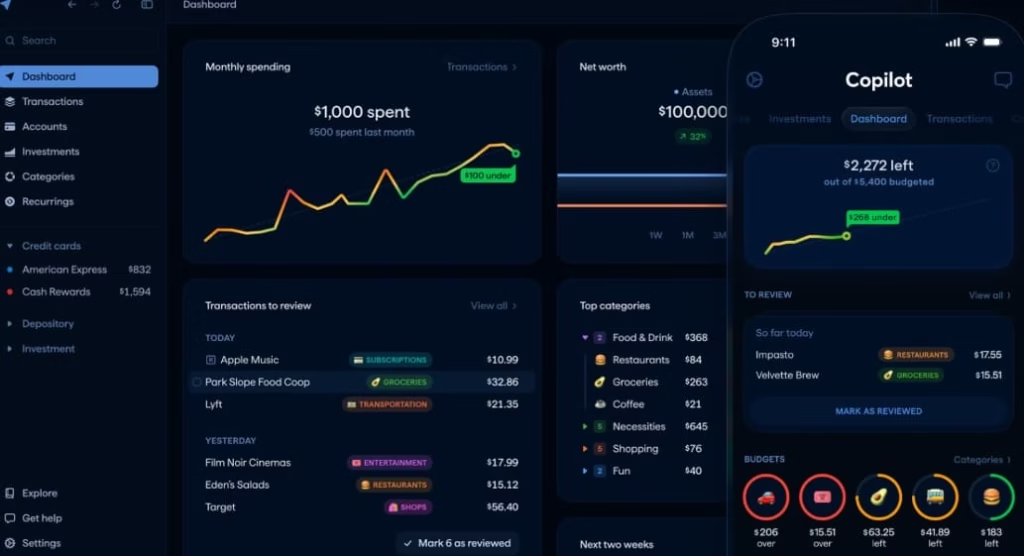
Copilot delivers a beautiful, Apple-first experience with deep AI automation for transaction categorization and insights. It feels premium and effortless.
Best For: Beginners and freelancers who use Apple devices and want clean design with smart predictions. Excellent for visual spenders.
Pricing: $13/month or $95/year (about $7.92/month). 30-day trial; no free tier.
Key Features:
- AI that learns and auto-categorizes every transaction with high accuracy
- Custom budgets that roll over unused amounts
- Predictive insights on future spending and savings goals
- Net worth tracking and investment visibility
- Clean dashboards and reports that make sense at a glance
Real Use Case: A graphic designer freelancer used Copilot to tag irregular client payments. The AI flagged that subscription creep was eating 15% of income and suggested exact cuts. Within two months, they rolled over savings into a new laptop fund without manual effort—the predictions were spot-on for their variable workflow.
3. Monarch Money
Monarch offers a complete financial overview with flexible budgeting and strong collaboration tools. Its AI enhances forecasting and pattern recognition.
Best For: Families, couples, freelancers, and small businesses needing shared access and long-term planning.
Pricing: Core plan $14.99/month or $99.99/year (~$8.33/month). Plus tier for advanced features (~$199.99/year). 7-day trial.
Key Features:
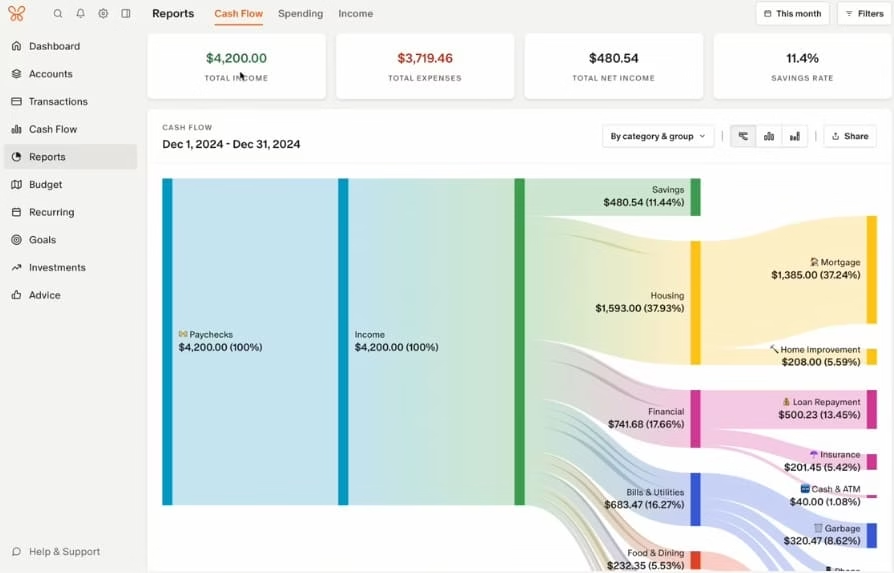
- Flexible budgeting by category or group with easy adjustments
- Net worth dashboard across all accounts
- Collaborative sharing for partners or advisors at no extra cost
- AI-powered forecasting for multi-income scenarios
- Custom reports and recurring transaction handling
Real Use Case: A small business owner and spouse used Monarch to sync personal and business-adjacent accounts. When a major client delayed payment, the forecasting tool showed the exact impact and suggested tweaks (like pausing a non-essential tool). They collaborated in-app to reallocate without arguments—something spreadsheets never achieved.
4. YNAB (You Need A Budget)
YNAB uses zero-based budgeting with AI-enhanced transaction categorization and pattern recognition. It focuses on giving every dollar a job.
Best For: Beginners serious about building lasting habits and freelancers who want control over irregular cash flow.
Pricing: $14.99/month or $109/year. 34-day trial.
Key Features:
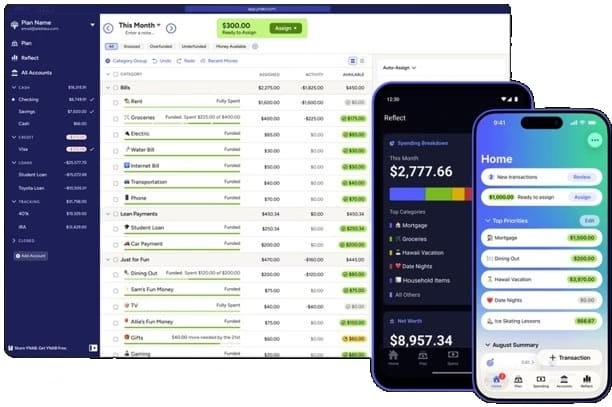
- Zero-based system that forces intentional allocation
- AI/ML for automatic categorization and insights
- Goal tracking with clear progress visuals
- Educational resources and workshops
- Shared access for up to 6 people
Real Use Case: A new freelancer transitioning from salary used YNAB’s rules to assign every incoming payment immediately. The AI helped spot creeping software costs. After the first few months, they reported breaking the paycheck-to-paycheck cycle and building a 3-month buffer—classic YNAB magic with modern smarts.
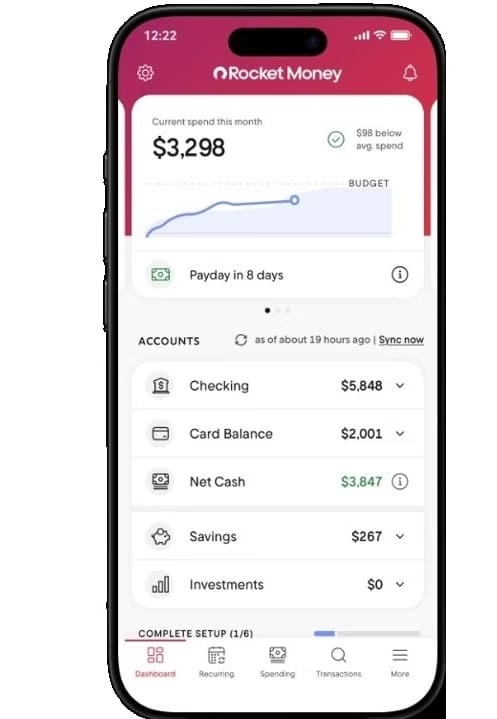
5. Rocket Money
Rocket excels at subscription management with AI-driven budgeting and bill negotiation. It helps cut waste fast.
Best For: Beginners and small businesses drowning in subscriptions and recurring costs.
Pricing: Free tier available. Premium $6–$14/month (you choose). Bill negotiation performance-based.
Key Features:
- AI scans and identifies subscriptions for easy cancellation (with concierge help)
- Custom budgets and automated savings
- Credit monitoring and bill negotiation
- Net worth tracking in premium
- Alerts for unusual spending
Real Use Case: A solopreneur discovered forgotten tools and SaaS subscriptions totaling $180/month via Rocket’s scan. The concierge canceled two, negotiated another, and the AI suggested reallocating savings to taxes. They saved enough for a marketing boost in one quarter.
Also know: Top Cross Chain NFT Marketplaces in 2026
Comparison Table: Best AI Tools for Budgeting
| Tool | Best For | Starting Pricing | Key AI Strength | Standout Perk |
|---|---|---|---|---|
| Cleo | Beginners/Freelancers | Free / $5.99+ mo | Conversational coaching | Fun, adaptive personality |
| Copilot Money | Apple users/Beginners | $13 mo / $95 yr | Auto-categorization & predictions | Beautiful UX & rollovers |
| Monarch Money | Families/Freelancers | $99.99 yr (~$8.33 mo) | Forecasting & collaboration | Shared access & flexibility |
| YNAB | Habit builders | $14.99 mo / $109 yr | Intentional zero-based | Education + proven results |
| Rocket Money | Subscription killers | Free / $6–14 mo | Waste detection & negotiation | Quick wins on recurring costs |
How to Choose the Right AI Budgeting Tool
Start with your biggest pain point. Beginners overwhelmed by tracking? Try Cleo or Rocket for low-friction entry. Freelancers with variable income need strong forecasting—Monarch or YNAB shine here. Small businesses focused on costs? Rocket or Copilot for quick insights.
Consider device preference (Copilot for Apple), need for sharing (Monarch), or habit-building (YNAB). Test with trials—most offer them. Factor in your willingness to engage: conversational AI like Cleo for motivation, or automated like Copilot for set-it-and-forget-it vibes.
Pro Tip: Combine tools if needed—one for tracking (e.g., Copilot) and a general AI like ChatGPT for deeper “what-if” scenarios on exported data. Always review bank connections for security.
Expert Tips for Using AI to Save Money
- Feed it good data:Link all accounts early for better AI learning. Review categorizations weekly at first.
- Set “guardrail” rules:Use AI alerts for categories like dining out or SaaS tools.
- Review predictions monthly: AI improves with feedback; correct it to refine accuracy.
- Automate the wins:Enable micro-savings and rollovers so progress happens passively.
- Think beyond tracking:Ask your AI tool (or ChatGPT) for side-hustle ideas based on your spending data exports.
- Unique insight: The real power comes from combining AI insights with one human review session per month—tools handle the math, you handle the priorities. Users who do this report saving 10-20% more than app-only users.
FAQ
Q1. Do AI budgeting tools require linking bank accounts?
Most do for full power (via secure Plaid-like connections). You can often start manually, but automation shines with linked data.
Q2. Can these tools handle irregular freelance income?
Yes, Cleo and Monarch excel at variable patterns and forecasting gaps better than traditional apps.
Q3. Will AI replace my need to think about money? It reduces mental load dramatically but works best when you stay involved with goals and occasional reviews.
Conclusion
The best AI tools for budgeting turn a chore into an advantage. Beginners love Cleo’s approachable style, freelancers benefit from Monarch or YNAB’s forecasting, and anyone tired of subscriptions should start with Rocket Money.
Pick one, commit to a 30-day trial, and watch how small AI-guided changes compound into real savings and peace of mind. Your future self (and wallet) will thank you.
Start with the tool that matches your style today and use AI to finally make money work for you.

Amanda Starc
Amanda is a dedicated technical web content writer with a passion for transforming complex ideas into compelling and accessible online narratives. With a background in web development, and digital Marketing I bring a unique blend of technical expertise and creative storytelling to the digital domain.
